

A prospect messages you at 9 pm or on a Sunday, and nobody replies until lunchtime the next day? By the time your team calls back, they have already booked somewhere else?
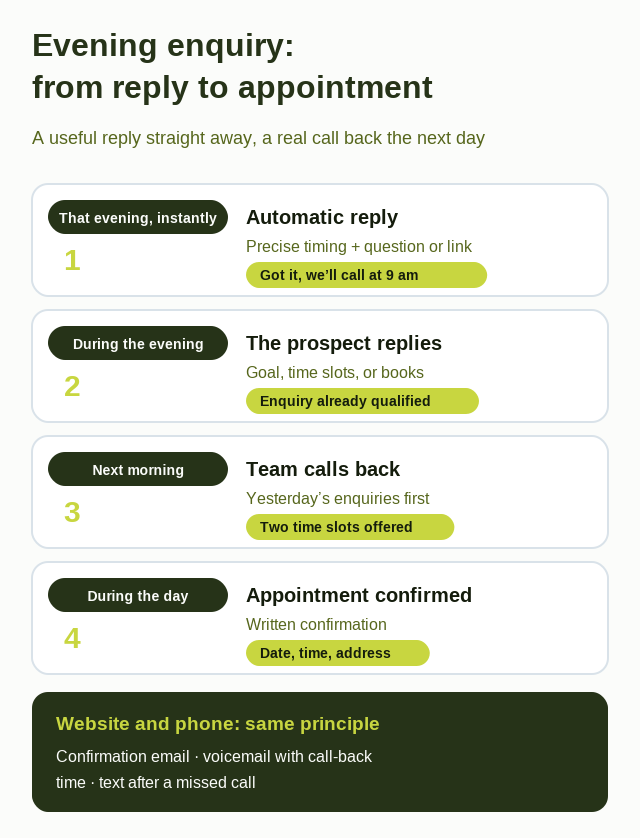
A well-written WhatsApp Business auto reply does more than say “we’ll get back to you tomorrow”: it confirms receipt, gives a precise call-back time and immediately offers a time slot or a useful question. In the app, two settings cover this, the greeting message and the away message, backed up by quick replies for the team.
This article is for managers of wellness, slimming, beauty and fitness centres, and for franchise head offices that want every site to handle out-of-hours enquiries the same way. You will find the step-by-step setup, eight templates designed to lead to an appointment, what to do for enquiries that come in through the website or by phone, and the limits of the app when several people or several sites reply.
Key takeaways
- An evening enquiry should not wait until the next day: the longer first contact takes, the harder the person is to reach. It is one of the six leak points of national leads.
- The away message can be scheduled “outside of business hours”, provided your opening hours are set in your business profile. See the step-by-step setup.
- A good template leads to an appointment: a precise timeframe, a qualifying question or a booking link. See the 8 templates and our questions to qualify a prospect.
- The auto reply does not replace the call back the next morning: that is stage 2 of our guide to lead handling in a franchise network.
Want to know what a prospect receives when they message your centres on a Sunday evening? Request WhatALead’s free audit: we send real out-of-hours enquiries and record who replies, when and how.
WhatsApp Business auto reply: the app’s 3 messages
The WhatsApp Business app offers three kinds of prepared replies, and each plays a different role in an evening enquiry.
- The greeting message is sent automatically when someone messages you for the first time. WhatsApp describes it as an automatic welcome message sent when a person contacts you for the first time (WhatsApp Business, “5 ways to make a strong first impression”, French edition).
- The away message is sent when someone messages you while you are unavailable: at all times, during a custom period, or outside of business hours (WhatsApp Help Center, “How to use away messages”).
- Quick replies are not sent on their own: they are saved texts that the team inserts into a conversation by typing “/”. The app allows up to 50 (WhatsApp Help Center, “How to use quick replies”).
For evening enquiries, the away message does most of the work. The greeting message welcomes new contacts at any time, including when the team is busy with a client. Quick replies save time the next morning, when the team picks up each conversation.
Setting up the away message step by step
You set it up on the phone that holds the centre’s WhatsApp Business account. The official help page describes these steps (labels may vary with the app version and language):
- Enter your opening hours in the business profile. Without them, the “outside of business hours” option does not appear.
- Open the Tools tab, then “Away message”, and turn it on.
- Write the message by tapping the default text. Replace it with one of the templates below.
- Choose the schedule: always send, a custom schedule (for holidays or a closure) or outside of business hours.
- Choose the recipients: everyone, everyone not in your address book, everyone except certain contacts, or only certain contacts.
- Save, then test it from another phone one evening, after closing time.
One point to watch: the WhatsApp help page states that the device must have an active internet connection for away messages to be sent (WhatsApp Help Center, “How to use away messages”). If the front-desk phone is switched off or offline at the weekend, the message does not go out.
For recipients, “everyone not in your address book” is often the right choice: your regular clients do not receive an automatic message every evening, and new prospects get an instant reply.
What an unanswered evening enquiry costs
An enquiry that waits overnight loses value, because the prospect’s interest fades and they often contact several centres at once. Two older studies, both from the United States, give a sense of scale.
The audit published in the Harvard Business Review in 2011 sent a test enquiry to 2,241 US companies: 37% replied within an hour, 24% took more than 24 hours and 23% never replied. In a separate study of 1.25 million enquiries, companies that tried to make contact within an hour were nearly seven times as likely to qualify the prospect as those that waited an hour longer (Oldroyd, McElheran and Elkington, “The Short Life of Online Sales Leads”, HBR, March 2011, figures reported by SmartCompany, July 2011).
An even older study, presented in 2007 by InsideSales.com and an MIT researcher on more than 15,000 enquiries, found that the odds of reaching a prospect called within 5 minutes, rather than after 30 minutes, were 100 times higher (Elkington and Oldroyd, “Lead Response Management Study”, 2007). It was co-authored by a software vendor and does not cover centres: take the trend, not the exact figure.
None of these studies measures franchise networks. They still confirm what centres experience: a Sunday-evening enquiry called back on Monday at lunchtime has already gone cold.
Illustrative example: what a same-evening reply is worth
Here is a fictitious calculation to illustrate the method. Replace each assumption with your own figures.
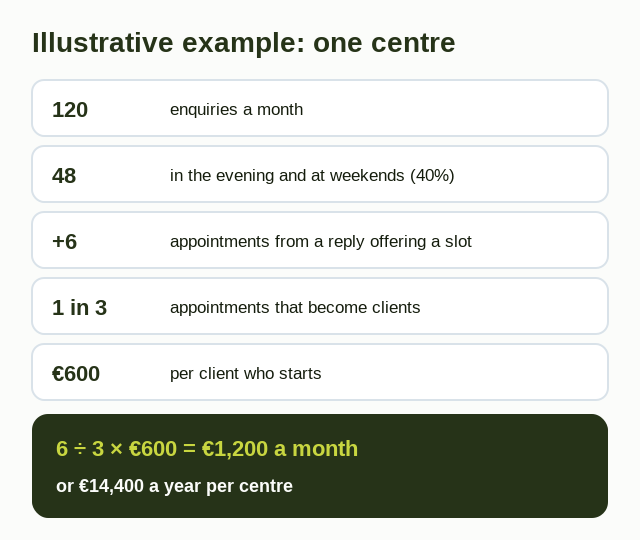
| Assumption (illustrative example) | Value |
|---|---|
| Enquiries received per month in one centre | 120 |
| Share arriving in the evening and at weekends | 40%, so 48 enquiries |
| Extra appointments from a reply that offers a time slot | 6 |
| Share of appointments that become clients | 1 in 3 |
| Revenue from a client who starts | €600 |
| Gain | 6 ÷ 3 × €600 = €1,200 a month, or €14,400 a year |
Across a network of ten centres, the same calculation gives €144,000 a year. To find your own share of out-of-hours enquiries, log the arrival time of every enquiry for four weeks, across all channels.
8 auto reply templates that lead to an appointment
Each template does three things: it reassures (the enquiry has been received), it commits (a precise call-back time) and it moves things forward (a question or a booking link). Replace the items in square brackets.
Greeting messages
1. Greeting with a qualifying question
Hello and thank you for your message! This is [First name] from [Centre]. So we can suggest the right appointment, what is your main goal? Reply in a few words and we will get back to you within the hour during opening hours.
2. Greeting with guided choices
Hello, welcome to [Centre]! Is your enquiry about: 1, a first trial session; 2, an existing appointment; 3, another question? Reply 1, 2 or 3 and we will take care of you.
Evening away messages
3. Evening away message with a call-back time
Good evening, thank you for your message! The centre is closed for tonight. [First name] will reply tomorrow from [opening time]. To save time: which days and times suit you for a first appointment?
4. Evening away message with a booking link
Good evening, thank you for getting in touch. The team will reply tomorrow morning. If you would rather choose your slot now, book your trial session here: [booking link]. You will receive a confirmation straight away.
Weekend and public holiday away messages
5. Weekend away message
Hello, thank you for your message! The centre is closed on [day]. We will reply on Monday before [time]. Tell us in one sentence what you are looking for: we will prepare your answer and two time slots to offer you.
6. Exceptional closure or public holiday
Hello, the centre is closed today ([reason: public holiday, annual leave]). We reopen on [date] at [time] and will reply to you as a priority. You can already book your slot here: [booking link].
Templates for common cases
7. Pricing request out of hours
Good evening, thank you for your interest! Our packages depend on your goal and your schedule: that is what we go through together during the trial session, free and with no commitment [adapt to your offer]. [First name] will call you tomorrow morning, or book here: [link].
8. Existing client who wants to move an appointment
Good evening, thank you for letting us know! Tell us the day and time of your current appointment, and two slots that would suit you. We will confirm the new slot tomorrow from [opening time].
Template 7 deliberately avoids sending a price list on its own: a price without context, received at 10 pm, often triggers a comparison rather than a booking. Template 8 complements your appointment reminder messages: a client who gives notice the evening before is still engaged, and their slot can go to someone else.
What about enquiries that do not come through WhatsApp?
The same principle applies to every channel your evening enquiries come through: an instant reply, a precise timeframe and a next step. WhatsApp is only one of the means.
- The website form. The message shown after submission and the confirmation email should say when the person will be called back, and offer the booking link. A “Thank you, your message has been sent” says nothing about what happens next.
- The centre’s voicemail. State the time at which messages are returned, and invite callers to write on WhatsApp or by text message to be contacted sooner. A voicemail that only gives opening hours loses evening calls.
- The text message after a missed call. Many phone systems and centre software packages can send an automatic text to a number whose call went unanswered, with the booking link.
- Online booking. The most direct way to convert an evening enquiry is still to let the person choose their own slot, then confirm it in writing.
These messages answer a request the person has just made: they are not marketing messages. If you add a promotion, or contact the person later to offer your services, the rules change. In France, the CNIL (the data protection authority) states that marketing by text message or email to consumers requires their prior consent, except for existing clients and similar products or services, and that every message must let the person refuse further messages (CNIL, “La prospection commerciale par courrier électronique, SMS-MMS et automate d’appel”, June 2026, in French). Check the equivalent rules in your own country.
The app’s limits for a centre or a network
The WhatsApp Business app is designed for a business that replies from its phone, so it shows its limits as soon as several people or several sites handle enquiries.
- One message for everyone. The away message is the same for every person: it does not read the reply, does not ask a second question and does not offer a real slot from your calendar.
- A phone that must stay connected. As seen above, the away message depends on the device’s connection.
- No routing between sites. In a network, each centre has its own number and its own settings. Head office sees neither the texts used, nor each centre’s response time, nor the enquiries left unanswered.
- Texts that drift. Each manager writes their away message their own way, and the promise made to the prospect changes from one centre to the next.
To go further, a network uses the official WhatsApp Business API, connected to its calendar and tools: the conversational journey can then qualify the enquiry, offer real slots, follow up by SMS, RCS or email when the person does not reply, and report each centre’s metrics to head office. This is what WhatALead puts in place, after an audit of how your centres already handle their enquiries.
Test your out-of-hours enquiries in 7 questions
Answer “yes” or “no” thinking about the last four weeks.
- Does an enquiry received after closing time get a reply within minutes, on WhatsApp as on the website?
- Does that reply give a precise call-back time, rather than “as soon as possible”?
- Does it offer a next step: a question, a booking link or a choice of slots?
- Does the phone holding the WhatsApp Business account stay on and connected in the evenings and at weekends?
- Are the previous day’s enquiries handled first in the morning, before the day’s other tasks?
- Do you know what share of your enquiries arrives in the evening and at weekends?
- Do all centres in the network use the same texts and the same response-time promise? (if you have a single centre, answer “yes”)
Reading your result (count the “no” answers):
- 0 to 1: your evenings are covered. Test them once a quarter by messaging your centres yourself on a Sunday evening.
- 2 to 3: enquiries go cold overnight. Start with questions 2 and 3: rewriting the away message takes ten minutes.
- 4 or more: your out-of-hours enquiries wait until the next day without a useful reply. Rework the illustrative example above with your own figures to estimate the cost.
WhatALead can run this test with you, centre by centre: book your free audit. We send real enquiries in the evening and at weekends, measure response times and give you the list of leaks. No commitment.
After the auto reply: calling back quickly the next day
The auto reply buys time, but it does not replace the first real contact, because the prospect expects a person who understands their request. The next morning, handle the overnight enquiries before anything else, in order of arrival, and pick up from the answer the person already gave: they should not have to repeat their goal.
To do this, prepare three quick replies in the app: picking up an evening enquiry, offering two slots and confirming the appointment in writing. For the rest of the conversation, use our six qualifying questions, then our method for replying to enquiries within minutes at every stage, from enquiry to appointment.
Frequently asked questions
How do I schedule an auto reply on WhatsApp Business?
In the app’s Tools tab, open “Away message”, turn it on, write your text, then choose the schedule: always, a custom schedule or outside of business hours. The last option requires your opening hours to be set in your business profile.
What is the difference between WhatsApp Business and WhatsApp?
WhatsApp Business is the app designed for businesses. It adds a business profile (opening hours, address, description) and business tools: greeting message, away message and quick replies. For a network, the official WhatsApp Business API also connects conversations to each centre’s calendar and tools.
How do I write an automatic message?
A good automatic message confirms receipt, gives a precise response time and offers a next step: a question, a choice of answers or a booking link. Sign it with the first name of the person who will call back, and avoid promotions in a reply message.
How do I set up a greeting message on WhatsApp Business?
The greeting message is set up in the app’s business tools, like the away message. It is sent automatically when someone messages you for the first time. Use it to ask a first question that helps you direct the enquiry.
Evening enquiries that become appointments
An enquiry received at 9 pm can still become an appointment, provided it gets a useful reply straight away and a real call back the next day. WhatALead starts with an audit: we test your centres as a real prospect would, at any time of day, and find where enquiries go cold. Then we build a tailored system, based on your methods.
Book your free audit and find out what happens to your evening and weekend enquiries.