

Your clients forget their first consultation or trial session even though your team already sends a reminder? Or nobody really knows who sends what, and when?
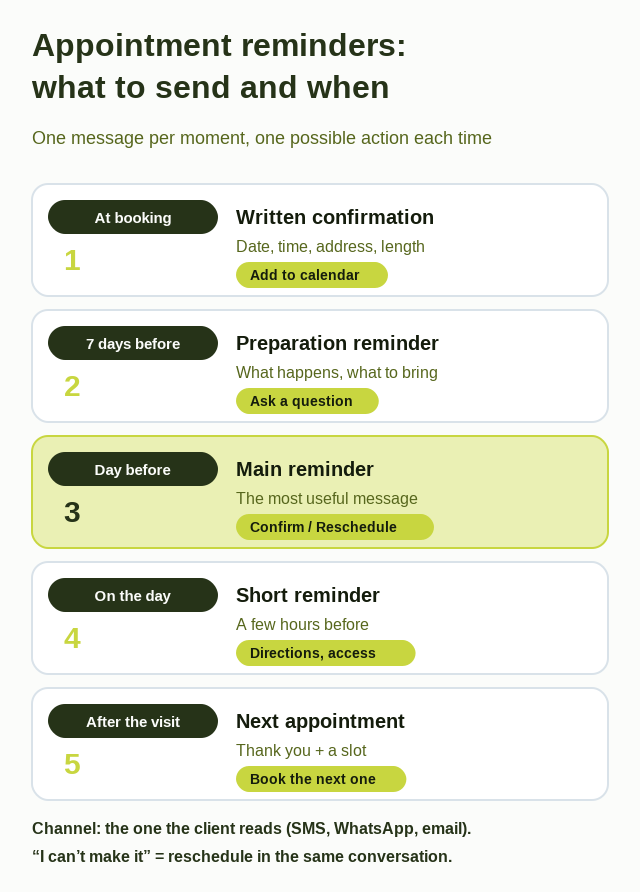
An effective appointment reminder comes down to two main messages: one the day before, which lets the client confirm or reschedule with a single reply, and a short one on the day, with the address. Add a written confirmation at the time of booking, and a preparation reminder when the appointment was booked more than a week ahead.
This article is for managers of wellness, weight-loss, beauty and fitness centres, and for franchise head offices that want the same messages across their network. You will find a sending schedule, eight SMS templates to copy, WhatsApp versions with buttons, what to do when the client replies “I can’t make it”, and a test to assess your own reminders.
Key takeaways
- The day-before reminder is the most useful one, as long as the client can reply “I confirm” or “I need to reschedule”. It is part of the sequence described in our guide to reducing missed appointments.
- Written reminders increase attendance: in the 2013 Cochrane review, attendance was 78.6% with a text reminder versus 67.8% without one. See the figures and their limits.
- SMS, WhatsApp or email: use the channel the client reads. On WhatsApp, reminders go through templates approved by Meta.
- If the client still does not turn up, follow up with our missed appointment message templates.
- A well-reminded appointment starts with a well-handled enquiry: it is stage 5 of our guide to lead handling in a franchise network.
Want to know what your clients actually receive between booking and their appointment? Request WhatALead’s free audit: we book like a real client and review every message received.
Appointment reminders: when to send them
The right schedule depends on the time between booking and the appointment itself, because the longer that gap, the more likely the client is to forget. An appointment booked for tomorrow does not need the same sequence as a consultation set three weeks ahead.
| Moment | Purpose of the message | When to send it |
|---|---|---|
| At booking | Confirm in writing: date, time, address, length, contact person | Within minutes |
| One week before | Prepare: what happens, what to wear, what to bring | Only if booked more than 7 days ahead |
| The day before | Get a confirmation or a reschedule | Late morning or early afternoon, during your opening hours |
| On the day | Restate the time and directions | 2 to 3 hours before, or the evening before for an early-morning appointment |
| After the visit | Offer the next appointment | The same day, while the experience is fresh |
Send the day-before reminder when someone on the team can reply: a client who writes “I can’t make it” should get a new slot within the hour, not the next day.
For an appointment booked for the same or the next day, the confirmation is often enough, followed by the short reminder on the day.
What studies say about reminders
Written reminders bring more people through the door, and how they are worded matters as much as sending them. Two sources show this, both from healthcare, as no published study covers wellness centres.
The Cochrane review of mobile phone reminders pooled 8 randomised trials and 6,615 participants. Attendance rose from 67.8% without a reminder to 78.6% with a text reminder, and to 80.3% with a phone call reminder; the authors found text and call reminders had a similar effect, with a lower cost per attendance for texts in the two studies that measured it (Gurol-Urganci et al., Cochrane, December 2013). The authors rate the quality of the evidence as low to moderate.
In the UK, a team from Imperial College, the Department of Health and the Behavioural Insights Team tested several SMS wordings sent five days before an appointment, with around 20,000 patients of a London hospital trust. The message stating what a missed appointment costs cut missed appointments from 11.1% to 8.4%, while the other wordings tested in the same trial had no significant effect (GOV.UK, “A zero cost way to reduce missed hospital appointments”, January 2016).
For a centre, the lesson is not to quote a cost to the client, but to take care over the content: a reminder that says why the slot matters and how to free it up works better than a neutral one.
Illustrative example: what a reminder people can reply to is worth
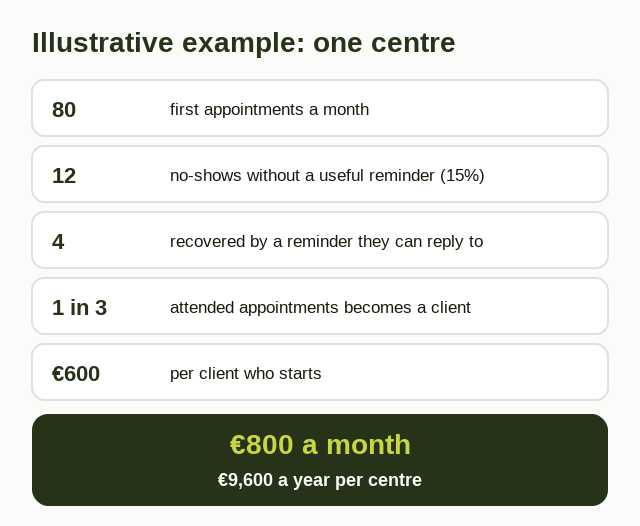
Here is a fictional calculation to illustrate the method. Replace each assumption with your own figures.
| Assumption (illustrative example) | Value |
|---|---|
| First appointments per month at one centre | 80 |
| No-shows without a useful reminder | 12 (15%) |
| No-shows turned into a reschedule or a visit by a reminder people can reply to | 4 |
| Share of attended first appointments that become clients | 1 in 3 |
| Revenue from a client who starts | €600 |
| Gain | 4 × €600 ÷ 3 = €800 a month, or €9,600 a year |
In a ten-centre network, the same calculation gives €96,000 a year. The real figure depends on your current no-show rate: measure it over four weeks before setting a target.
8 SMS appointment reminder templates
These templates are written for a wellness, weight-loss, beauty or fitness centre. Replace the items in square brackets, keep sentences short and always sign with the first name of someone at the centre: a reminder from a person reassures more than an anonymous message.
At booking
1. Confirming a first consultation
Hello [First name], this is [Adviser’s name] from [Centre]. Your consultation is confirmed for [day] [date] at [time], at [address]. It lasts about [length]. Can’t make it? Reply to this message and we will offer you another slot.
2. Confirming a trial session
Hello [First name], your trial session at [Centre] is booked for [day] at [time]. Please bring [kit / towel / water bottle]. Any questions before you come? Message us here. See you soon, [Name].
One week before (booked far ahead)
3. Preparation reminder
Hello [First name], your appointment at [Centre] is coming up: [day] [date] at [time]. During this first appointment we will [what happens, in one sentence]. Remember to bring [items]. See you next week, [Name].
The day before
4. Reminder with confirmation
Hello [First name], we look forward to seeing you tomorrow at [time] at [Centre]. Reply YES to confirm, or MOVE if the time no longer suits you: we will offer you another slot straight away.
5. Reminder for a regular client
Hello [First name], a reminder for your session tomorrow at [time] with [Practitioner’s name]. If you can’t come, let us know by replying: your slot can then go to someone else. Thank you!
On the day
6. Short reminder with directions
Hello [First name], see you later at [time]! Address: [address]. [Access details: parking, door code, floor]. Running late? Message us here.
7. Early-morning appointment (sent the evening before)
Good evening [First name], see you tomorrow at [time] at [Centre], [address]. The team opens at [opening time]. Have a good evening, [Name].
After the visit
8. Offering the next appointment
Thank you for coming in today, [First name]. As discussed, your next session can be on [day] at [time] or [day] at [time]. Reply 1 or 2 and we will book it.
A word on wording: a reminder about an appointment the person booked is not a sales message. As soon as it slips in an offer or a promotion, it changes nature and the rules on direct marketing apply, as set out in our guide’s section on reminders and consent. Keep your reminders free of offers.
Appointment reminders on WhatsApp: templates with buttons
On WhatsApp, a reminder is not a free-form message. Meta states that template messages are the only type of message a business can send outside a customer service window opened by the client, and each template must be approved before it can be sent (Meta, “Templates overview”). Since a reminder often goes out several days after the client last replied, it needs to be prepared as a template.
Three Meta rules shape how you write them:
- The category. A “utility” template follows up on a user action or request and has no promotional intent; a template that mixes information and promotion is classed as “marketing” (Meta, “Template categorization”, updated 30 January 2025). A reminder without an offer therefore stays in its lane.
- The buttons. A template can contain up to 10 quick reply buttons, each with a label of 25 characters maximum; with more than three buttons, only two are shown and the rest sit behind a “see all options” button (Meta, “Template components”, updated 6 May 2026). Two or three buttons are enough for a reminder.
- The variables. The first name, date, time and address are fields filled in at sending: the fixed text must read correctly whatever the values.
Day-before WhatsApp template
Hello {{1}}, we look forward to seeing you tomorrow at {{2}} at {{3}}, {{4}}. Could you confirm you are coming?
Buttons: “I confirm” · “I need to reschedule”
On-the-day WhatsApp template
Hello {{1}}, see you later ({{2}})! Here is how to get here: {{3}}. Running late? Reply to this message.
Button: “I’ll be late”
Preparation WhatsApp template
Hello {{1}}, your first appointment at {{2}} is on {{3}}. Do you have any questions before you come?
Buttons: “All clear” · “I have a question”
The point of buttons is not technical: they give the client a one-tap way to reply, and your team a clear piece of information. An “I need to reschedule” received the day before is a slot you can still fill.
The same principle applies to the other channels: an SMS asking for a YES or MOVE reply, an email with a reschedule link, an RCS message with buttons when the client’s phone supports it. The channel matters less than the ability to reply.
What to do when the client replies “I can’t make it”
Reschedule in the same conversation, straight away, because a client who lets you know is still engaged: they took the trouble to reply. If you ask them to call the centre or go back through the website, some of those reschedules will turn into lost appointments.
- Thank them for letting you know, without blame: “Thanks for letting us know, [First name].”
- Offer two specific slots, close in time: “I can offer you Thursday at 6 pm or Saturday at 10 am.”
- Confirm the new slot in writing, like a new booking, and release the old one for another client.
- No reply within 24 hours? Follow up once. If there is still no reply, treat it as a missed appointment, using our messages after a missed appointment.
For a first appointment, check at the same time that the service matches the request: repeated rescheduling sometimes signals a need that was misunderstood from the lead qualification stage.
Automating reminders without losing your centre’s tone
Your reminders can go out automatically from three families of solutions, each with its limit:
- Your centre’s booking or till software often sends an SMS or email reminder. It is the quickest to switch on, but the messages are sometimes fixed and client replies do not always reach the team.
- An SMS sending platform lets you schedule messages from a file or a calendar. It handles volume well, the conversation that follows less so.
- A conversational system connected to your calendar (official WhatsApp Business API, SMS, RCS or email) sends the reminders, reads the replies and offers a new slot, with a handover to the team when needed.
Whatever the solution, check three things before switching it on: the texts are yours rather than the default ones, the client can reply, and their reply reaches a person or triggers a reschedule. In a network, head office sets the sequence and the templates, and each centre adds its name, address and slots.
Test your reminders in 8 questions
Answer “yes” or “no”, thinking about your appointments over the last four weeks.
- Does every client receive a written confirmation within minutes of booking?
- Does a reminder go out the day before every appointment, including at weekends?
- Can the client reply to that reminder to confirm or reschedule?
- Does an “I can’t make it” reply get a new slot within the hour, during your opening hours?
- Are reminders sent on the channel your clients actually read?
- Have the texts of your reminders been reviewed and personalised, rather than left as the defaults?
- Do you know your no-show rate for first appointments, separately from follow-up appointments?
- Do all centres in the network send the same reminder sequence? (if you have a single centre, answer “yes”)
Reading your score (count the “no” answers):
- 0 to 1: your sequence is solid. Test it once a quarter by booking an appointment yourself.
- 2 to 4: avoidable no-shows are slipping through. Start with questions 3 and 4: a reminder people cannot reply to turns every scheduling conflict into a no-show.
- 5 or more: your appointments rely mostly on your clients’ memory. Rework the illustrative example above with your own figures to estimate what it costs.
WhatALead can run this test with you, centre by centre: book your free audit. We book real appointments at your centres, record every message received and give you the list of avoidable no-shows. No commitment.
Frequently asked questions
How long before the appointment should the reminder be sent?
The main reminder goes out the day before, during your opening hours, so the team can handle reschedules. Add a short reminder 2 to 3 hours before the appointment, and a preparation reminder a week before if it was booked more than seven days ahead.
How many reminders should you send?
Two reminders before the appointment are enough in most cases: the day before and on the day, on top of the confirmation at booking. Beyond that, clients may stop reading your messages. An appointment booked far ahead justifies a third, preparation message.
SMS or WhatsApp for an appointment reminder?
The best channel is the one the client reads and can reply on. SMS reaches everyone without an app; WhatsApp allows reply buttons and an ongoing conversation, but requires the client’s agreement to be contacted on that channel. Many centres combine both, with email for the detailed confirmation.
What should an appointment reminder message include?
The centre’s name, the day, the time, the address, and a way to confirm or reschedule. Add the first name of the person signing and, for a first appointment, what the client should bring. Avoid commercial offers in a reminder.
Fewer no-shows, without overloading your team
A well-built reminder sequence deals with forgetting, hesitation and scheduling conflicts before they become empty slots. WhatALead starts with an audit: we test your journey as a real client would, listen to your team and identify where appointments are being lost. Then we build a tailored system based on your methods: confirmations, reminders and reschedules in conversational journeys on the official WhatsApp Business API, with SMS, RCS or email as relays, connected to your calendar and with attendance tracked per site. To get started, book your free audit.